Legit.Health · Clinical Trials
Features Overview
From Image Capture to Data Delivery
Explore the platform's key capabilities — guided at-home imaging, real-time AI quality and pose validation, automated severity scoring, anonymised data exports, and sponsor dashboards.
Decentralised Imaging Capture
Subjects capture and upload images from home using any mobile device. Site staff and administrators manage the trial lifecycle and access AI-generated results — subjects only receive upload confirmation.
🏢
Site Staff Administrator
- ▸Creates and manages site staff accounts
- ▸Enrolls subjects and assigns them to visits
- ▸Monitors protocol compliance and deviations
- ▸Views AI-generated reports and scores
👩⚕️
Site Staff / Investigator
- ▸Guides subjects through the imaging protocol
- ▸Monitors subject upload compliance
- ▸Reviews AI severity scores and reports
- ▸Flags deviations to the administrator
🧑💼
Subject (Patient)
- ▸Logs in with a unique phone/password credential
- ▸Follows guided 11-perspective image capture
- ▸Uploads images from home (decentralised)
- ▸Receives upload confirmation only — no AI results
Image pipeline
Subject captures & uploads images
→AI validates quality & computes scores
→Site Staff & Subjects do not see AI results
→Data available to site CRO or sponsor
Automatic Image Quality Control
Before an image is accepted, the AI validates focus, lighting, framing, and anatomical coverage in real time. If the image does not meet the required quality, the app explains the error and prompts the subject to retake the photo.
Quality error feedback
Click on the buttons to open the camera or to upload a file.
1 / 11
It seems that the image does not contain enough quality to be analyzed.
Automatic Positioning Control
If the subject's body is not correctly positioned according to the protocol instructions, the app displays a message explaining the error and asks the subject to retake the photo following the guidelines provided.
Capture screen
Click on the buttons to open the camera or to upload a file.
Trunk
Front view
4 / 11
Positioning error feedback
Click on the buttons to open the camera or to upload a file.
4 / 11
Your body is not correctly positioned according to the instructions.
Automatic Anonymisation
Before any image is exported or shared, the platform applies facial redaction, background blur, tattoo removal, and metadata stripping to comply with GDPR and HIPAA requirements.
Real anonymisation examples
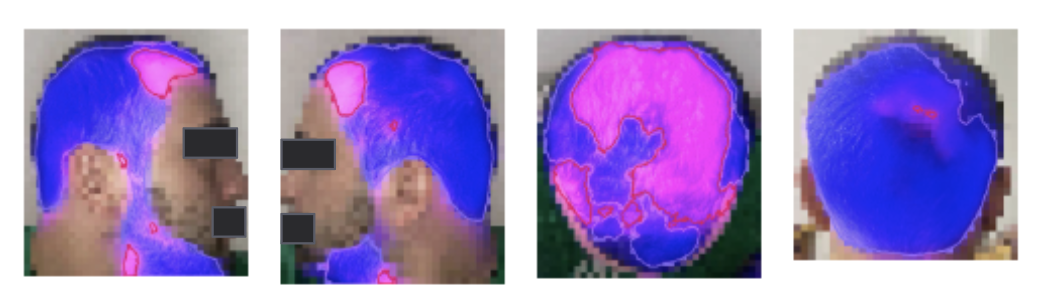
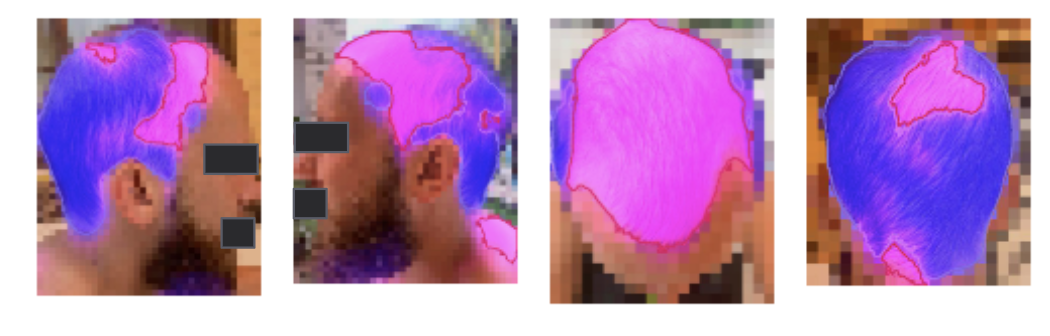
Available anonymisation methods
| Type | Description |
|---|---|
| Automatic blur | Background around segmented lesion or body surface area blurred |
| Automatic Black box: eyes & mouth | Automatic black box applied on eyes and mouth; other facial elements can be specified |
| Automatic (tattoos) | Tattoos automatically identified and covered by black box |
| Automatic + Manual review | Automatic masking with manual verification for quality assurance |
Deviation Notification Example
When subjects miss an image upload, the platform automatically notifies site staff Administrators with a deviation digest email listing affected subjects and required follow up actions.
Legit.Health Notification
to me ▾
2026-06-19 00:00:00
The contents of this email are confidential.
This is your weekly summary of scheduled data capture deviations for your site. Please review the table below and address any queried uploads.
Summary
| Site code | Total subjects | Subjects with queried uploads |
|---|---|---|
| CV5-ES10001 | 20 | 3 |
Detailed deviations:
| Subject code | Site code | Visit code | Window end date | Days late | Status |
|---|---|---|---|---|---|
| ES100016001 | CV5-ES10001 | Week 52 | 2026-04-20 | 60 | Queried |
| ES100016002 | CV5-ES10001 | Week 52 | 2026-05-10 | 40 | Queried |
| ES100016003 | CV5-ES10001 | Week 64 | 2026-06-14 | 5 | Queried |
Status = Queried: The set of images is not uploaded within the expected visit window.
Window end date: Represents the final calendar day of the protocol-defined visit window that has passed without a successful upload.
Days late: Represents the total number of days that have elapsed from the Window end date until the date this summary email was generated.
You can use clinicaltrials.legit.health to consult the details for each subject listed above.
If you have questions or requests about this notification, please contact your Study Coordinator or Medical Monitor.
Kind regards,
Dashboard Example
The sponsor and CRO dashboard provides real-time enrollment metrics, per-site compliance rates, deviation counts, and image upload history — giving full operational visibility without accessing patient data.
The sponsor dashboard will be shown here in a future update.
Data Transfer Example
Structured CSV or JSON exports are delivered on a per-DTA schedule, anonymised and ready for EDC or CRO integration. Each transfer includes image metadata, AI scores, and subject visit data.
Secure Data Transfer Architecture
Data Transfer structure
Security Features
- IAM Role-Based Access
Customer IT receives dedicated IAM credentials with least-privilege permissions
- Encryption at Rest & Transit
AES-256 server-side encryption + TLS 1.3 for all transfers
- Audit Logging
CloudTrail logs all access events for compliance reporting